Before you can build and deploy Kanzi applications to Android devices, you need to set up the Kanzi build environment for Android and install on your computer the USB device drivers for your Android device. See Installing the Kanzi build environment for Android.
If your Kanzi application includes a Kanzi Engine plugin, you have to build and deploy your application manually. See Building and deploying Kanzi applications to Android manually.
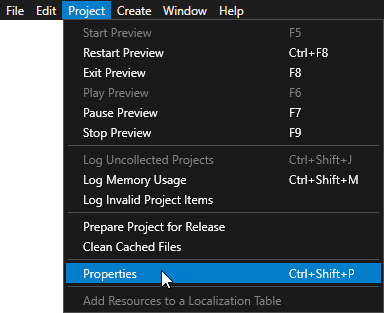
To build and deploy your Kanzi application to Android from Kanzi Studio:
<target name="-pre-compile"> target. For example, to add all .xml and .png files in the <ProjectName>/Application/bin directory use<target name="-pre-compile">
<echo>Copying assets</echo>
<copy todir="${asset.absolute.dir}">
<fileset dir="${asset.absolute.dir}/../../../../bin">
<include name="**/*.kzb"/>
<include name="**/*.cfg"/>
<include name="**/*.xml"/>
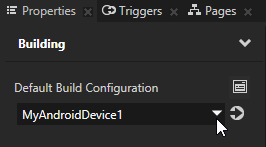
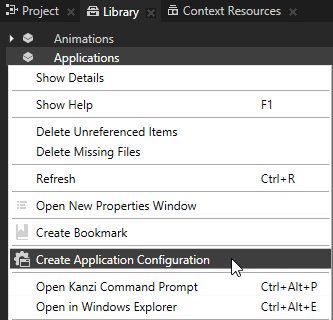
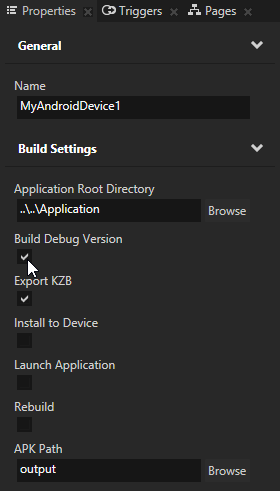
<include name="**/*.png"/>You can configure the building of your Kanzi applications for Android using the application configurations in Kanzi Studio. For example, you can set the target architecture, and whether Kanzi should deploy the built package to the attached target device. You can set which application configuration you want to use when you select > Export > Build Android Package in > in the Default Build Configuration property.
To set the Java version for your Kanzi applications for Android, add to the Application/configs/platforms/android/build.xml as the first child elements of the top level <project> element and set the value attribute to the Java version you want to use
<property name="java.target" value="7" />
<property name="java.source" value="7" />
SCons runs the SConstruct file in the configuration directory of the platform from which you run the scons command. SConstruct file is the entry point for building the application and contains the information about the Kanzi Engine location and runs these files:
To build and deploy Kanzi applications to Android manually:
<target name="-pre-compile"> target. For example, to add all .xml and .png files in the <ProjectName>/Application/bin directory use<target name="-pre-compile">
<echo>Copying assets</echo>
<copy todir="${asset.absolute.dir}">
<fileset dir="${asset.absolute.dir}/../../../../bin">
<include name="**/*.kzb"/>
<include name="**/*.cfg"/>
<include name="**/*.xml"/>
<include name="**/*.png"/>scons command with the build parameters for your Kanzi application.| Syntax | scons <library> <type> <name> | ||||||
| Parameters |
| ||||||
| Examples |
// Builds the application with the default settings as specified
// in config.py and SConstruct configuration files.
scons
// Builds the debug version of the application with
// the OpenGL graphics library.
scons GL debug
// Builds the debug version of the application with the
// OpenGL ES 2.0 graphics library from the Kanzi Studio
// project named MyProject.
scons ES2 debug MyProject |
Scons builds the Kanzi application source code and binary files in the <ProjectName>/Application/output directory.
adb install or ant release install to install the .apk package of your Kanzi application on your Android device.adb install MyProject.apk
ant release install
When you receive this error while compiling Kanzi applications for Android:
[dex] Pre-Dexing C:\KanziWorkspace\3rdPartySDKs\android-sdk-windows\tools\support
	\annotations.jar -> annotations-fa751cd593bf7078e9c18d47a485e852.jar
[dx] Error: Could not create the Java Virtual Machine.Error occurred during
	initialization of VM
[dx] Error: A fatal exception has occurred. Program will exit.
[dx]
[dx] Could not reserve enough space for object heap
BUILD FAILED
Limit the max heap size of the dx tool in <KanziWorkspace>/3rdPartySDKs/android-sdk-windows/build-tools/18.1.0/dx.bat. Change the line:
setdefaultXmx=-Xmx1024M
to
set defaultXmx=-Xmx512M
Class not found: javac1.8
-Dbuild.compiler=javac1.7
[javac] C:\KanziWorkspace\Projects\Myproject.java:142: error: binary literals are not supported in -source 1.5
[javac]     private static int i = 0b10101;
[javac]                            ^
[javac]   (use -source 7 or higher to enable binary literals)
[javac] 1 error
You must use a version of Java which supports binary literals. See Setting the Java version for Kanzi applications.
Installing the Kanzi build environment for Android
Installing the Kanzi build environment manually
Tutorial: Create a simple in-vehicle infotainment application
